
How to Check NBI Clearance Status Online in 2026
If you’ve applied for an NBI Clearance, you’re likely eager to know if it’s ready. Maybe you’re wondering:
The good news is that you can easily check the status of your NBI Clearance online, and it takes just a few minutes. In this guide, we’ll walk you through the steps, explain what each status means, and share helpful tips to make the process smoother.
What is an NBI Clearance and Why is it Important?
An NBI Clearance is an official document issued by the National Bureau of Investigation. It confirms that a person has no criminal record or pending cases. You’ll need an NBI Clearance for:
How to Check Your NBI Clearance Status Online
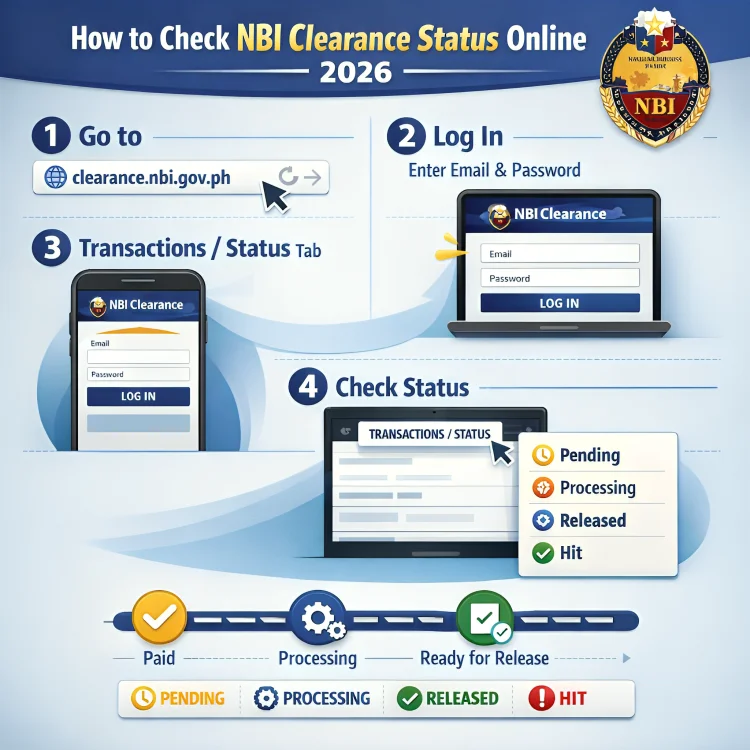
Here’s a simple step-by-step guide to check your NBI Clearance status:
Visit the Official NBI Clearance Website:
Go to the official NBI Clearance website.
Log in to Your Account:
Use the email and password you created when you registered. If you’ve forgotten your password, you can reset it by clicking on the “Forgot Password” option.
Navigate to the “Transactions” Tab:
Once logged in, go to the “Transactions” section. Here, you’ll see a list of your applications.
Click on the application to see the status of your NBI Clearance.
Check Your Clearance Status:
Click on the reference number of your application to get detailed information. You’ll be able to see the current status, payment details, and whether your clearance is ready for pickup or still being processed.
you can read: First-Time NBI Online Application Tips You Must Know
Understanding NBI Clearance Statuses
Here are the common status updates you may see and what they mean:
This means your NBI Clearance is finished and available for you to pick up.
- You’ll need to bring a valid ID and your reference number to collect it.
If the status says “With Hit,” it means that someone with a similar name appears in the NBI system. This doesn’t automatically mean you have a criminal record—it just means there’s a match that requires verification.
- This can take up to 8–10 working days to resolve.
If your status shows “Processing,” your clearance is still being reviewed. You may need to wait for 1–2 days for updates.
If you opted for delivery, this status means that your NBI Clearance has been shipped and is on its way to you.
How Long Does it Take for the NBI Clearance to Be Processed?
How to Verify Your NBI Clearance Online
You can also verify the authenticity of your NBI Clearance online. To do this:
This will confirm whether your clearance is legitimate.
Common Issues and How to Solve Them
I Can’t Log in:
Make sure you’re using the correct email and password. If you’ve forgotten your login details, reset your password.
My Status Isn’t Updating:
Wait 24–48 hours and check again. It might take a little while for the system to update.
Reference Number Not Found:
Double-check your reference number in the email or SMS you received after your application.
Website Errors:
Try using a different browser or clear your cache to solve any technical issues.
Tips to Ensure a Smooth NBI Clearance Process
FAQ’s
Final Words
Checking your NBI Clearance status online is quick and easy. By following these simple steps, you can track your application, know when your clearance is ready, and avoid unnecessary delays.
For a smoother experience, remember to check your status regularly and follow the helpful tips mentioned above. With the right information at hand, you’ll have your NBI Clearance in no time.


